



Long queues at the counter, misheard orders and not enough staff on shift – these are the reasons more and more venues are looking at a self-service kiosk for restaurants. Guests browse the menu on a touchscreen, add a side, pay by card and the order goes straight to the kitchen. It sounds simple, but does it pay off for every venue? This guide covers how a kiosk works, where it delivers the most, what it costs and how to roll it out so that guests and staff both like it.
What a self-service kiosk is and how it works
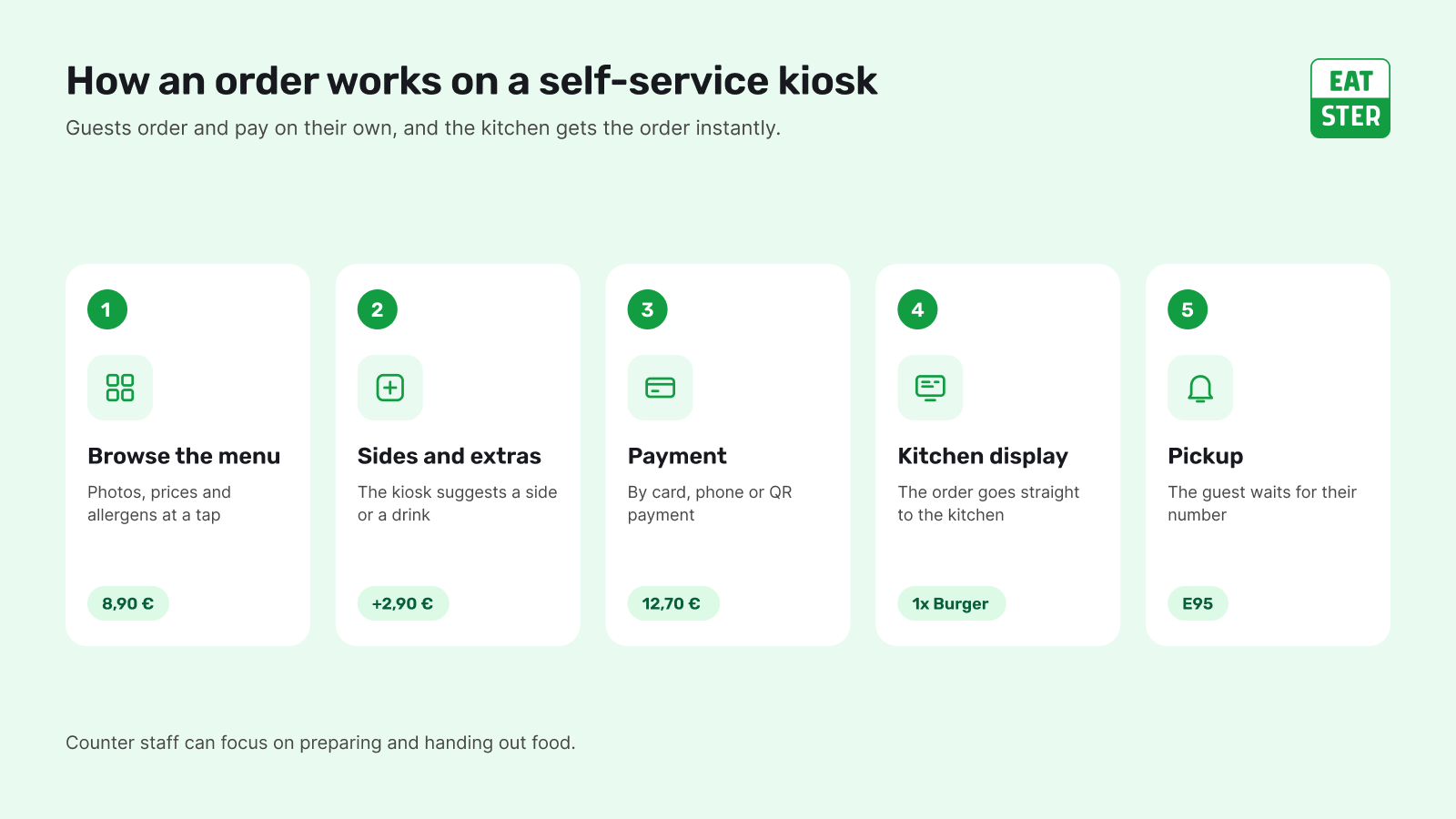
A self-ordering kiosk is a touchscreen with ordering software, a payment terminal and usually a receipt printer. Guests scroll through a menu with photos, choose variants and extras, and pay at the end. The order appears in the kitchen instantly and the guest gets a number to collect the food at the pickup counter – or to have it brought to the table.
What matters most is that the kiosk is not an island. It should run on the same system as your POS and kitchen, with one menu, one price list and one set of reports. Otherwise every price change or sold-out dish has to be updated in several places.
Why restaurants add a self-service kiosk
Faster service at peak times
At the counter, one person takes one order at a time. With kiosks, several guests order at once. The queue splits, waiting times drop and staff can focus on what a machine cannot do – cooking, handing out food and looking after guests.
A higher average ticket
A kiosk never forgets to suggest a side, a drink or a dessert. Guests can explore the whole menu without a queue behind them and are more likely to add extras. According to our data, orders placed through the Eatster ecosystem are on average 15% higher.
Fewer order mistakes
Guests enter the order themselves and see all of it before paying. No more misunderstandings over a noisy counter, and the kitchen gets exact instructions, including changes like "no onions".
Less pressure on staff
Staff shortages are a long-standing problem in hospitality. A kiosk does not replace the team – it takes over the routine part of the job: taking orders and payments. Venues can run more smoothly with fewer people on shift. The connected Eatster ecosystem helps save up to 25% of operating costs.
Better data
Every kiosk order lands in the system with all its details: time, items, extras and payment method. You can easily see what sells, when the rush hits and how well suggestions work.
Where a self-service kiosk for restaurants makes the most sense
- Quick-service restaurants and bistros – high order volumes, a focused menu and counter pickup.
- Food courts in shopping centres – guests want speed, compare several vendors and are happy to order on their own.
- Stadiums, arenas and festivals – short breaks, a huge rush within minutes and the need to serve as many people as possible at once.
- Cafés and bakeries with fast turnover – the kiosk takes the orders while the barista focuses on coffee.
- Workplace and school canteens – recurring lunch menus and predictable peak times.
A kiosk may make less sense in a full-service restaurant where personal contact is part of the experience. There, QR code ordering at the table is often the better choice – it supports servers rather than replacing them.
What to look for when choosing a kiosk
- Connection to the POS and kitchen. Kiosk orders must flow into the same system as counter sales and straight to the kitchen display.
- Payments. The kiosk should accept cards, mobile wallets and QR payments. In Slovakia, sellers must offer a cashless option for purchases over €1 since 1 May 2026, so a payment terminal is a must.
- Fiscal compliance. A kiosk sale is still a sale that must be recorded under local fiscal rules – in Slovakia in the eKasa system – with a receipt. Check how the solution handles this and whether the register is certified.
- Ease of use. Big buttons, food photos, allergens, several languages and an easy way back. Guests should be able to finish without help.
- Remote menu management. A price change, a new dish or a sold-out item should update on every kiosk at once.
- Hardware and support. A durable screen, a reliable printer and clear service terms. Find out what happens if a kiosk fails on a Saturday night.
How much does a self-service kiosk cost?
The cost has several parts, and it pays to add them up over a longer period, such as three years:
- hardware – the kiosk itself (floor-standing, countertop or wall-mounted), payment terminal and printer,
- software – the ordering system licence, sometimes per device,
- card processing fees – a percentage of every transaction, where every fraction counts at higher volumes,
- installation, menu setup and training,
- service and support.
On the other side are staff time saved, a higher average ticket and more guests served at peak times. Eatster licences start at €0 per month with the lowest card fees – see current plans on our pricing page.
Common concerns about kiosks
"My guests won't know how to use it"
Most people use a smartphone every day, so ordering on a touchscreen feels natural. Design is what counts: clear steps, large photos, readable prices and a visible back button. If the kiosk also offers other languages, international guests who would struggle at the counter will appreciate it too.
"We'll lose the personal touch"
The kiosk takes over order entry and payment, not hospitality. Staff who are not stuck ringing up orders all day have more time for guests at pickup, at the tables and for special requests. And the counter stays open for anyone who prefers to order from a person.
"What if the internet goes down?"
Ask the vendor how the system handles short outages, whether it can resend orders once the connection is back and what happens to card payments. For longer outages, have a clear procedure for counter staff, including how sales are recorded.
"A kiosk is an expensive investment"
Compare the total cost with how many orders the kiosk handles at peak times and how much it lifts the average ticket. Venues with high order volumes usually see a faster return than small venues with low turnover.
How to roll out a kiosk smoothly
- Start with the menu. Good photos, short descriptions, logical categories and well-chosen extras decide whether guests order more.
- Put the kiosk where people see it. Near the entrance or the queue, with enough space around it so guests do not get in each other's way.
- Keep the counter open. Some guests will want to order from a person or pay in cash. The kiosk is an extra option, not the only one.
- Plan the pickup. Guests need to know where and when to collect their food. An order number screen helps.
- Train the team. Staff should be able to help guests at the kiosk, especially in the first weeks.
- Watch the data. After a few weeks, review the average ticket, the most popular extras and waiting times, then fine-tune the menu.
Self-service kiosks in the Eatster ecosystem
Eatster self-service kiosks run on one system together with the POS, QR ordering, the mobile app and the kitchen display. You update menus, prices and availability in one place and the change appears everywhere. Eatster handles more than 100,000 transactions a month in 3 countries, with clients such as Aupark, Cassovar, X-BIONIC SPHERE, HC Slovan and OC Laugaricio – see our customers.
Summary: is a kiosk worth it?
A self-service kiosk pays off most for venues with fast turnover, peak-time queues and counter pickup – bistros, food courts, stadiums and festivals. It brings faster service, fewer mistakes and a higher average ticket. What matters is that it connects to your POS and kitchen, handles every common payment method and runs on a well-prepared menu.
Want to see how a kiosk would work in your venue? Try the demo or get in touch.

