



A "free" point of sale sounds like an offer you can't refuse. Look closer, though, and a free POS for restaurants almost never means zero cost. The licence may be €0, but you pay somewhere else – in card processing fees, hardware, paid add-ons or support. This guide breaks down the true cost of a restaurant POS, shows where the hidden costs sit and explains how to compare offers so there are no surprises three years down the line.
What "free" really means in POS pricing
Vendors use the word "free" in several different ways, and each one affects your costs differently:
- A €0 licence – you pay nothing monthly for the software; the vendor earns on card fees or paid upgrades.
- "Free" hardware with a contract – no upfront payment for the device, but a lock-in period and a higher monthly fee or card rate.
- A free starter plan – a limited version without stock, reports or a kitchen connection.
- A free government register – in Slovakia, the Financial Administration's virtual cash register (VRP) records sales at no cost, but it is not a full restaurant system.
None of these models is bad in itself. The trouble starts when you compare only the licence price and leave everything else out.
The true cost of a free POS for restaurants
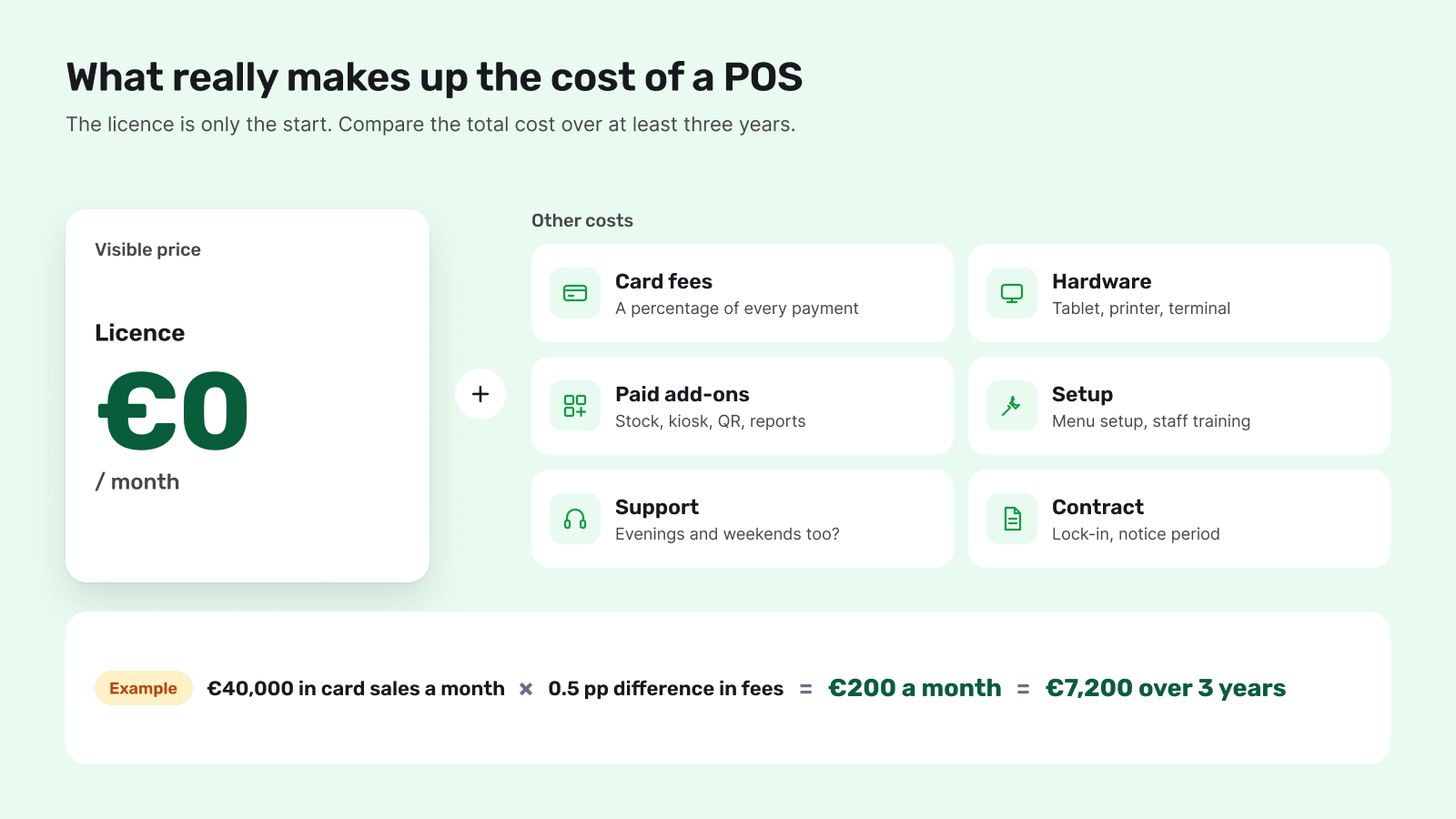
To see what a POS really costs, add up all of these items over the same period – ideally three years:
- Software licence – a monthly fee, often per device or location.
- Card processing fees – a percentage of every transaction, sometimes plus a fixed fee per payment.
- Hardware – a tablet or touchscreen terminal, receipt printer, cash drawer, payment terminal and kitchen screen.
- Add-ons – stock, kiosks, QR ordering, loyalty, accounting integrations or delivery.
- Setup and training – menu, printers and staff.
- Support and service – including whether it is available on evenings and weekends, when you are busiest.
- Contract terms – lock-in, notice period and early termination fees.
Card fees: the biggest cost you don't see at first
In restaurants where most guests pay by card or phone, payment fees are often the largest part of what a POS costs. The rate has several layers: the interchange fee, which the EU caps at 0.2% for consumer debit cards and 0.3% for consumer credit cards; card scheme fees; and the payment provider's margin. The margin is where offers differ most.
A small difference in the rate adds up quickly. As an illustration: if a business takes €40,000 a month by card and one offer charges 0.5 percentage points more, it pays an extra €200 a month. Over three years, that is €7,200 – far more than a typical POS licence.
So when comparing, ask for the exact rate for debit, credit and business cards, any fixed fee per transaction, any monthly terminal fee and how quickly the money reaches your account.
Hardware and add-ons: where "free" becomes a monthly bill
Free hardware with a contract is a convenient start, but its cost usually shows up elsewhere. Check whether you will own the device, what happens if it breaks and whether the system runs on standard tablets and printers. If the POS only works on proprietary hardware, every expansion – a second till on the terrace, a kiosk or a kitchen screen – costs more.
The same goes for add-ons. A basic plan may be enough for ringing up orders, but adding QR code ordering at the table, stock or reports later can raise the price considerably. Ask about the features you will want next year, not just the ones you need today.
When a free government register is enough
In Slovakia, the Financial Administration offers its virtual cash register free of charge. For very small businesses with few sales, it can be enough to record sales in eKasa. For a restaurant, it has clear limits: it does not connect to the kitchen, tables, stock or self-service channels such as kiosks and QR ordering. The time staff spend retyping orders by hand is a cost too – it just never appears on an invoice.
Mandatory cashless payments change the maths
Since 1 May 2026, sellers in Slovakia must let customers pay without cash for purchases over €1. The seller chooses the method – a card terminal, kiosk payments, QR payments or another option. For hospitality, that means card payments are no longer optional, so their fees belong in every POS comparison. For legal details, check with your accountant.
Common traps in "free" offers
- Card rates quoted as "from". The offer shows the lowest possible rate, while your guests' everyday cards are charged more.
- Long lock-in. Free hardware is tied to a multi-year contract, and leaving early costs money.
- Features behind a paywall. Tables, stock or reports only come with a paid plan nobody factored in.
- Locked-in data. When you switch systems, you cannot export your menu, sales history or customers in a usable format.
Checking these points up front saves you unpleasant surprises and long negotiations later.
How to compare offers: a three-year calculation
- Know your card turnover. Take your average monthly revenue and estimate the share paid by card and phone.
- Multiply it by each offer's rate. That gives your monthly payment costs; multiply by 36.
- Add the licence and add-ons. Include every feature you will actually use, not just the starter plan.
- Add hardware and setup. Including the payment terminal, printers and kitchen display.
- Factor in the contract. Lock-in and termination fees can change which offer comes out ahead.
- Compare the total, not the monthly fee. The cheapest licence is not always the cheapest POS.
Questions to ask a POS vendor
- What is the exact card rate, and does it differ by card type?
- Is there a monthly fee for the payment terminal or for each device?
- Which features are included and which are paid add-ons?
- Does the system run on standard hardware, or only on your devices?
- How long is the contract, and what does early termination cost?
- When is support available, and what does service cost?
- How are fiscal requirements handled, and who is responsible for certification?
A POS from €0 a month in the Eatster ecosystem
The Eatster POS has licences from €0 a month with the lowest card fees – see current terms on our pricing page. The POS, self-service kiosks, QR ordering, the mobile app and the kitchen display run in one system with one menu and one set of reports. Orders placed through the Eatster ecosystem are on average 15% higher, and businesses can save up to 25% of operating costs. Eatster handles more than 100,000 transactions a month in 3 countries, with clients such as Aupark, Cassovar, X-BIONIC SPHERE, HC Slovan and OC Laugaricio – see our customers.
Summary
A free POS can be a good choice as long as you understand what you are really paying for. Card fees, hardware, add-ons, support and contract terms matter far more than the licence price. Add up the total cost over at least three years and compare every offer the same way.
Want to know what a POS would cost in your business? Try the demo or get in touch.

